![[Bad]Influencers](https://smartmag.theme-sphere.com/news-time/wp-content/uploads/sites/28/2022/03/logo-Newstime-01-white.png)
![[Bad]Influencers](https://www.bad-influencers.com/wp-content/uploads/2026/06/badin2.png)


 by Jayden Leggett, Editor
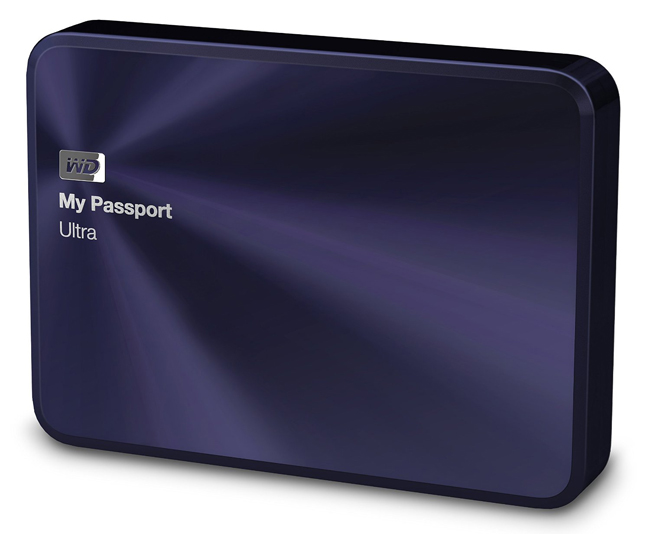
Portable storage that is sleek, stylish and sturdy with the Western Digital My Passport Ultra: Metal Edition 2 TB.
When it comes to hard drives, writing a review can be quite a daunting task. I mean, what the hell can you write about? As it turns out, quite a lot, at least with this fine offering from Western Digital. First of all there is the design of the unit itself. With its dimensions measuring up at 11x8x1.7cm and weighing in at under 300g, the My Passport Ultra: Metal Edition 2 TB is a very portable device indeed. Then there’s the aluminum design with a metallic blue finish, which makes the whole package all the more sexier. Included with the device is a quick start guide and USB 3.0 cable (the My Passport Ultra: Metal Edition is compatible with both USB 3.0 and 2.0).
 Windows users will have no issues getting this great little gadget up and running in no time as it is already configured with NTFS formatting. When first plugging this gadget into my Windows 7 machine, the drive was ready to rock in under thirty seconds. Instead of just jumping straight in and manually copying across my various data files, I figured I should do something that I have never done before… install the included software. As it turns out, this was an immensely wise decision.
The Western Digital My Passport Ultra: Metal Edition 2 TB comes set-up with an AutoPlay launcher that enables the user to install three different programs: WD Drive Utilities, WD Security and WD SmartWare. WD Security allows the user to set a password on the hard drive itself, so that the next time it is inserted into any computer, that password must be entered correctly, otherwise the drive won’t even become visible to the user. Very simple to use and very practical for ensuring your sensitive data doesn’t fall into the wrong hands.

WD Utilities is geared more towards tech-heads, as it allows the user to perform a range of activities such as performing diagnostics (which will scan the drive to search for bad sectors), setting sleep time (the amount of idle time before the drive goes into sleep mode), registering the device (to stay informed of updates via email), and erasing the contents of the drive (which will permanently erase everything, even the WD software). Those who aren’t obsessive backup police will probably give this one a miss, but for those who care, WD Utilities is a quite a powerful tool.
Saving the best for last, the WD SmartWare application is where the majority of users will head to when backing up their data. The taskbar icon shows information at a glance about the hard drive’s temperature, percentage of total storage used and so on, but it is when you are properly inside the program itself that its true usefulness becomes apparent. Here is where you can easily conduct several different kinds of data backup. You can set automatic backups of your computer, with options for exactly which files you want to be backed up, and how often. A simple view will allow you to choose categories (photos, documents etc), while those wanting more control over what gets copied can opt to meticulously choose each and every file they want to be backed up.
 What’s more, the data transfer rates are very zippy. Unfortunately my computer doesn’t have USB 3.0 capabilities, but even by USB 2.0 standards I was very impressed with how quickly the My Passport Ultra: Metal Edition 2 TB was copying across my data via the WD SmartWare application. During my testing, 6.5gb of my computer’s data had been backed up in under 8 minutes (again, this was via USB 2.0, so rest assured that 3.0 users can expect dramatically faster transfer speeds).
All in all, I really couldn’t find anything to fault with the My Passport Ultra: Metal Edition. Could the unit have been a little lighter? Maybe. Could the data transfer speeds be any faster? Possibly, I guess. Could the included software have been designed any better? I doubt it. What you get with the Western Digital My Passport Ultra: Metal Edition 2 TB is a high-quality portable hard drive with a brilliant physical design and some top-notch software. If you’re serious about data backup, this hard drive will not disappoint.

Rating: 

ComicsOnline gives the Western Digital My Passport Ultra: Metal Edition 2 TB 4.5 out of 5 shiny blue aluminum stars.
Keep connected to ComicsOnline.com and synchronize with us at our Facebook and Twitter pages for more gear news, reviews and everything geek pop culture!

